
 Audiobook Studio 1.x docs
The Voice Lab
The Voice Lab is where you build your narrators: a voice for each reader or character, cloned from short recordings.
At a glance
- A Voice is an identity (for example "Dracula").
- A Variant is a style of that voice (for example "Angry" or "Calm"), built from its own recordings.
- Add 3 to 5 clean
.wavsamples, then build. - Open it from the microphone icon in the top bar.
Voices and variants
- Voice: a narrator or character identity. Every voice has at least one variant.
- Variant: a style or mood of the same voice, such as Normal, Angry or Whisper, each built from its own recordings.
- Samples: the recordings used to clone the voice.
Create a voice
- Click + New Voice at the top and give it a name.
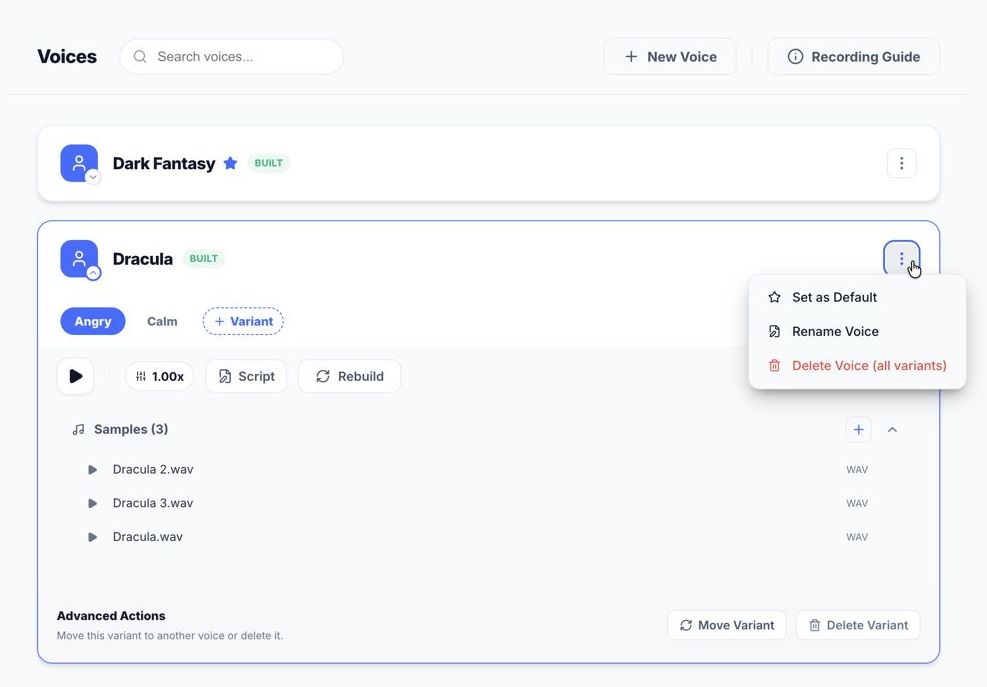
- Open the voice's card. Opening one card closes the others.
- Drop 3 to 5 clean
.wavfiles into the Samples area. (You can also use the add button.) - Click Rebuild if the voice needs it, then Generate Sample to hear a preview.
- To add a style, click + Variant and give it its own samples.
Tune and test
- Speed: set the default speaking rate between 0.5x and 2.0x.
- Script: change the text used for the preview clip.
- Samples: the first sample shapes the voice most; later ones add nuance. Mixing clean clips with different delivery styles can give a richer voice.
- Update indicator: a small turning arrow on a voice's avatar means a variant needs samples or a rebuild.
- Voice menu: the three dots on a card let you set the default voice, rename a voice, or delete it.
Heads up: Deleting a voice removes all of its variants and sample files from your disk.
Each voice can use its own engine. XTTS (Local) is the default; the optional cloud engine is explained in Settings.
Sharing a voice
Each voice keeps its own files in its own folder (a profile, a built voice file, and a preview), so renaming, moving or sharing a voice is safe. A lightweight starter voice only needs the profile, the built file and an optional preview, not every original recording.